
Investing.com: Stock Market
INVESTING.comFinance
4.711.40K Reviews
- Version
- 6.49.1
- Installs
- 50.00M
- Age Rating
- Everyone
Screenshots



Our Review of Investing.com: Stock Market
 Analysis by Appyee
I’d approach Investing.com: Stock Market as a market information hub rather than a shortcut to investment decisions. Its appeal is the ability to keep quotes, financial news, portfolio tracking and economic events close at hand. I find that useful when I want to understand what is moving markets without jumping between several sources, but the amount of information also means it works best with a clear purpose. Opening it to check one holding is a different experience from trying to follow every headline and price change at once.
What the free starting point means
The app is free to download, so you can try it without paying upfront. It also offers in-app purchases, with listed item prices ranging from $0.99 to $538.80; those figures describe a broad purchase range, not a single required fee. I would treat the free entry point and optional spending as separate questions: first see whether the available experience suits your routine, then decide whether any paid option is worth considering. A high potential price does not, by itself, tell me what a particular purchase includes or whether it is useful for a given person.
That distinction matters in finance apps, where people may assume that a paid tier is necessary for reliable information or that a free app automatically covers every need. I wouldn’t make either assumption. Investing.com is free to install, while the value of any purchase depends on its specific terms and on what you want from the app. Before spending, I’d check the purchase details shown in the app and compare them with a concrete need, such as reducing interruptions or accessing a particular capability. If the free version already lets you follow your watchlist and review market context comfortably, there may be no reason to pay.
Where the value comes from
For me, the practical benefit is not simply seeing a quote. It is being able to connect a price move with the surrounding context: a company headline, a broader market shift, or an upcoming economic event. That can make a quick check more informative than a bare number in a basic quote app. The portfolio tools can also give an at-a-glance view of holdings, while news and analysis provide material to investigate further rather than treating every fluctuation as meaningful.
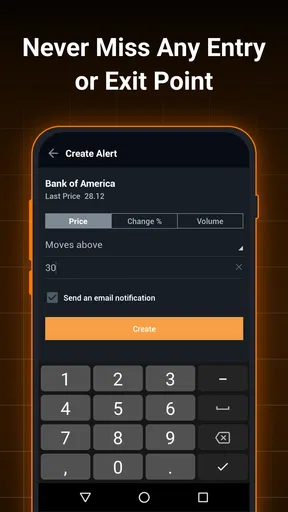
A useful routine is to build a small watchlist around the investments or markets you actually follow, then use alerts selectively. I’d avoid turning on notifications for every possible movement. A notification should answer a question you already care about; otherwise it becomes another interruption and makes it harder to tell a relevant change from background noise. Likewise, I’d use the economic calendar to prepare for events that could affect the markets I watch, not as a promise that a particular event will predict a price direction.
The trade-offs of an all-in-one market app
A broad finance app saves switching between tools, but breadth has a cost: there is more to filter and more opportunity to mistake a stream of updates for a decision signal. Market quotes and analysis can help me ask better questions; they cannot decide whether an investment suits my finances, goals or comfort with risk. I’d verify important details before acting, especially when a fast-moving quote or a headline seems to demand an immediate response.
I would also separate information tracking from trade execution in my own routine. If I need a specialized brokerage workflow, account-specific services or a particular research method, a dedicated provider may be a better fit. Investing.com can sit alongside those tools as a place to monitor markets and gather context, rather than needing to replace them. That division keeps expectations realistic and reduces the temptation to treat an information dashboard as a complete financial plan.
Who is most likely to get value
I think the app makes the most sense for curious investors, people following several markets, and anyone who wants a single place to check prices, headlines and economic events. A beginner can use it to learn what kinds of information surround a market move, provided they are willing to slow down and distinguish reporting from advice. Someone who already has a portfolio elsewhere may still find it useful as a companion for watchlists and broader market context.
It is less compelling for someone who only wants a simple long-term savings tool, has no interest in following market news, or prefers a quiet interface with only a balance and a few basic actions. It may also frustrate readers who want every item curated around one narrow investing strategy. In those cases, a simpler portfolio tracker or the tools supplied by a chosen financial provider may involve less setup and less reading.
A realistic way to use it day to day
Imagine checking your investments during a lunch break after seeing a headline about a company you follow. I would open the relevant quote, compare it with the broader market context, scan the related news, and check whether an economic event is also in view. Then I’d save the item for later research rather than placing a trade just because the price has moved. This workflow is useful because it turns a quick glance into a small, repeatable review while leaving the actual decision to a calmer moment.
For a more deliberate setup, I’d keep separate lists for holdings and companies I’m merely researching. That prevents a watchlist from becoming a vague collection of interesting names and makes alerts easier to interpret. I’d also review those lists occasionally: removing a symbol I no longer follow is a simple way to make the app quieter and more useful. These habits matter more than trying to monitor every market the app can show.
What to know before relying on it
Investing.com is published by INVESTING.com and is a finance app with a long-running presence: it was released in 2013. Its average rating is 4.6 from around 988,000 ratings, and it has been installed over 50 million times. Those figures suggest a widely used product, but popularity is not a guarantee that its layout, information or purchase options will match your preferences. I’d use the app myself for monitoring and context, then judge it by whether it makes my own research clearer rather than by its scale alone.
The current version is 6.45 and it requires Android 7.0 or later. The content rating is Everyone, though the financial subject matter is naturally most useful to people interested in markets. For a first try, I’d start with a small watchlist, set only a couple of meaningful alerts, and spend time learning where quotes, news and calendar information appear. That gives you a fair sense of whether the app’s breadth helps or simply adds clutter.
First Impressions and User Experience
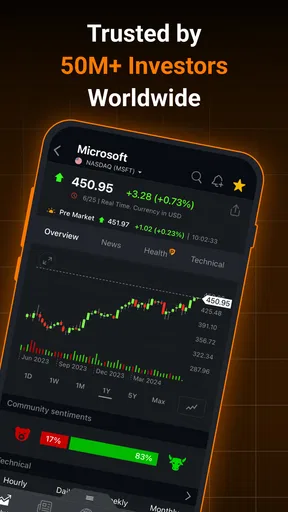
When you first open Investing.com: Stock Market, you’re greeted with a sleek interface that's both inviting and intuitive. It’s got this neat balance between being feature-rich and user-friendly, which is a win-win in my book. Navigating through the different sections is a breeze, thanks to its well-organized menu. Seriously, no more endless scrolling just to find what you're looking for.
Features That Stand Out
Now, let’s get into the nitty-gritty. The app is packed with features, but here are a few that really stood out to me:
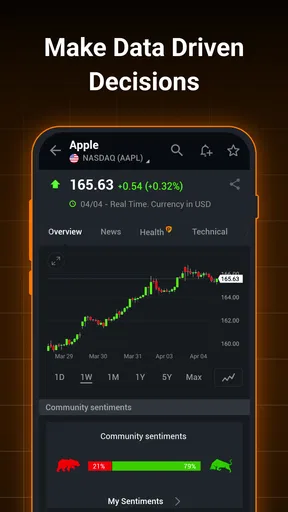
- Real-time Data: The app provides real-time quotes for thousands of stocks from major global indices. This is crucial for making informed decisions on the fly.
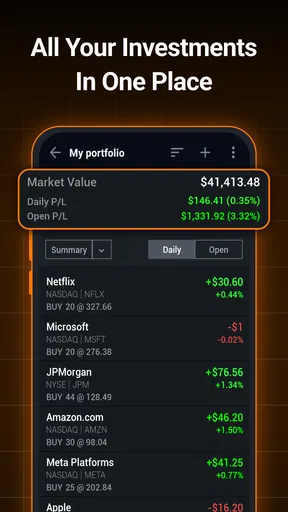
- Portfolio Management: You can easily track your portfolio, and it offers a pretty comprehensive breakdown of your investments. It's like having a personal financial advisor in your pocket.
- Economic Calendar: This feature is a game-changer. It keeps you updated on upcoming economic events, helping you to strategize your trades effectively.
- News and Analysis: The app aggregates news from trusted sources, and its analysis section is gold for those looking to dive deeper into market trends.
These features make the app a powerhouse for anyone looking to keep a pulse on the financial world.
Performance and Reliability
In terms of performance, the app is pretty solid. It loads quickly, and the data refreshes almost instantaneously, which is crucial when you’re making decisions based on real-time information. I’ve used it on both Android and iOS, and it runs smoothly on both platforms.
Customization and Alerts
One of the app's stronger suits is its customization options. You can tailor the alerts to get notifications only for the stocks or events that matter to you. This level of personalization ensures that you’re not bombarded with unnecessary information.
Community and Support
Another cool aspect is its community feature. You can engage with other traders and investors, share insights, and even get tips. The support team is responsive and eager to help, which is always a plus in my book.
Bottom line? If you're serious about investing, or even just curious, Investing.com: Stock Market might just be the app you need to stay ahead of the game. It's not just an app; it's a tool that empowers you with information and insights, making your investment journey smoother and more informed.
Give it a shot and see how it transforms your trading experience. Happy investing!
Verdict
Strengths of Investing.com: Stock Market
- Comprehensive market data access.
- User-friendly interface design.
- Real-time stock alerts available.
- Wide range of financial tools.
- Supports multiple languages.
Limitations of Investing.com: Stock Market
- Ads can be disruptive.
- Limited features on free version.
- Occasional lag in data refresh.
- Requires stable internet connection.
- Some features need in-app purchases.
Similar Picks in This Category
View All
Google Wallet
Google LLC4.3

Airtel: Recharge, Bank & Loans
Airtel4.0

PayPal - Pay, Send, Save
PayPal Mobile4.2

DANA Indonesia Digital Wallet
PT Espay Debit Indonesia Koe4.5

Binance: Buy Bitcoin & Crypto
Binance Inc.4.8

Cash App
Block, Inc.4.7
You May Also Like
View All
Frequently Asked Questions
What features does the Investing.com app offer?
The Investing.com app provides a comprehensive suite of features including real-time data on stocks, indices, commodities, and currencies. Users can access financial news, detailed charts, and analysis tools. Additionally, the app offers customizable alerts and a personal portfolio tracker, making it a versatile tool for both beginners and experienced investors.
Is the Investing.com app free to use?
Yes, the Investing.com app is free to download and use. However, it offers a premium subscription that unlocks additional features such as advanced charting tools, ad-free usage, and enhanced data feeds. This option is ideal for users seeking a more in-depth and uninterrupted experience.
How accurate is the data provided by Investing.com?
Investing.com is known for its reliable and accurate financial data, sourcing information from reputable global exchanges. The app provides real-time updates, ensuring users receive the most current data available. However, users should always cross-reference information and consider it as part of their broader research strategy.
Can I customize notifications and alerts on the Investing.com app?
Yes, users can fully customize notifications and alerts to suit their investment preferences. This includes setting alerts for price changes, news updates, and economic events. Customization ensures that users receive timely information relevant to their specific interests, enhancing their decision-making process.
Does the Investing.com app support multiple languages?
The Investing.com app supports multiple languages, making it accessible to a global audience. This feature allows users from different regions to engage with the app in their preferred language, enhancing usability and ensuring a more personalized experience.
